Search
What is Auto Enhance and should I use it?
Auto Enhance is a helpful tool in the albumworks editor that uses image correction software to automatically adjust brightness, contrast, and colour balance to help your photos print at their best.
Option 1: Auto Enhance within the editor
Use this if you'd like to preview the changes before ordering.
Click the image you want to enhance.
In the right-hand column of the editor, click the 2nd tab at the top (with two curved arrows).
Tick the Auto Enhance (Perfectly Clear) checkbox. You’ll see the results immediately.
If you don’t like the result, simply untick the box.
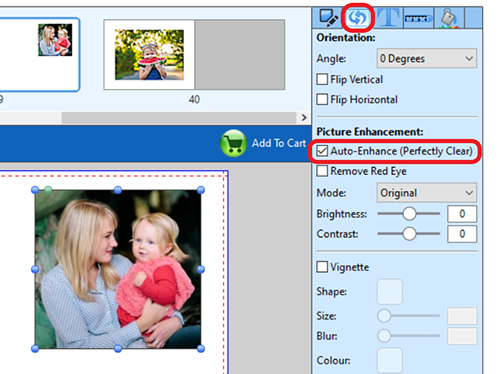
You can also apply it to multiple photos on the same page spread by holding the Shift key while clicking on each image. With all selected, tick the Auto Enhance checkbox to apply changes to all at once.
Option 2: Auto Enhance at checkout
Use this if you want to apply enhancement to all photos at once, but keep in mind that you won’t see the results before printing.
We don’t recommend using this method if you’ve already edited your photos in another program like Photoshop or Lightroom, or if you’ve manually enhanced them within our editor.
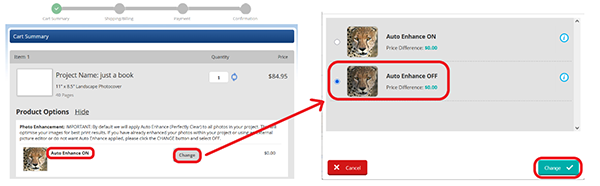
In the shopping cart, Auto Enhance is turned on by default. To turn it off:
Click the CHANGE button under Auto Enhance
Select OFF, then click CHANGE again to confirm
For a more detailed walkthrough, watch our tutorial:
If you’d like to discuss the best approach for your project, feel free to get in touch with our Customer Service team