Super Special - How to get 20% off a second copy.
MARCH 17TH, 2014

This Super Special offer allows you to get another copy of a Photo Book you ordered in the past for 20% off the full price! So that's one for your parents, partner or friends!
Just place an order for another copy of a previously ordered Photo Book BEFORE Mon 24 March 9PM AEST.
Here's how to do it:
STEP ONE
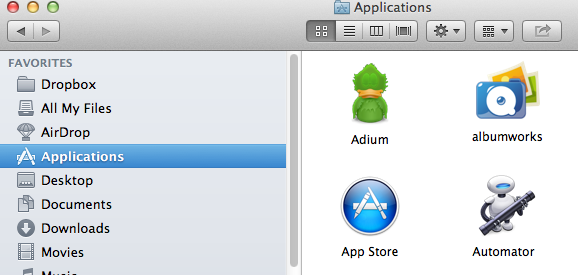
Open the albumworks Editor. This should be on your desktop or in the applications folder on whichever device you made your Photo Book. Just look for the albumworks logo.
STEP TWO
Click "Edit Existing Project".

STEP THREE
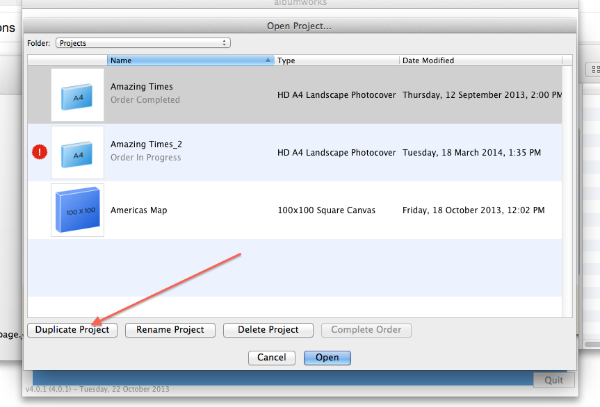
Create a duplicate copy of the project you wish to re-order. To do this, click once on the project name then click "Duplicate Project" at the bottom of the screen. Give the duplicate project a new name and then open the project.
STEP FOUR
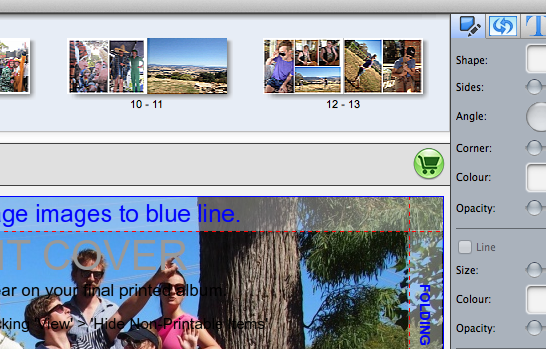
If you don't want to make any changes (and you can if you want, as long as the order remains the same number of pages and print quality - ie. remains the same price as the original order), click on the green Shopping Cart to checkout.
STEP FIVE
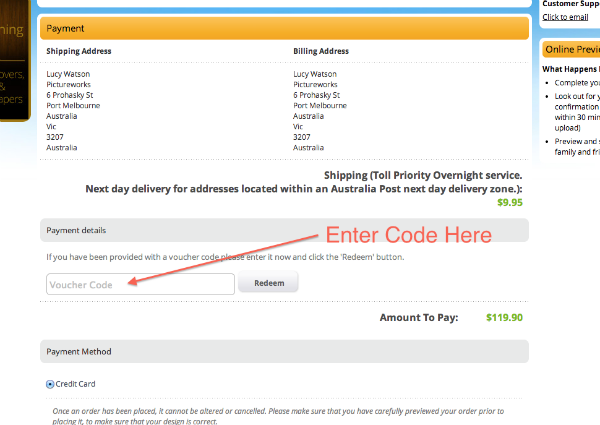
Progress through the Shopping Cart, selecting Finishing Options and Shipping/Billing details, then on the Payment page enter the following code into the Voucher Code field in the Shopping Cart: SUPER6COPY. This will remove 20% of the price of one Photo Book.
STEP SIX
Complete your order.
If you need any more help, just contact our Customer Service team on 1300 553 448.
We hope you enjoy your Photo Book!